JavaScript is disabled. For a better experience, please enable JavaScript in your browser before proceeding.
You are using an out of date browser. It may not display this or other websites correctly.
You should upgrade or use an
alternative browser .
Lấy ảnh từ file PDF trên máy tính và Mac
Không phải phần mềm PDF nào cũng hỗ trợ trích xuất hình ảnh dễ dàng. Dưới đây là một số cách giúp bạn sao chép và lưu ảnh từ file PDF trên các hệ điều hành phổ biến. Người dùng có thể trích xuất hình ảnh từ tập tin (file) PDF bằng Adobe Acrobat Reader, một phần mềm miễn phí hỗ trợ Windows và MacOS. Trước tiên, cần tải Adobe Acrobat Reader từ trang web chính thức của Adobe và cài đặt theo hướng dẫn. Sau khi cài đặt, mở tài liệu PDF bằng cách chọn File > Open hoặc kéo...
Đọc bài gốc tại
đây
Đăng nhập một lần thảo luận tẹt ga
window.googletag = window.googletag || {cmd: []};
googletag.cmd.push(function() {
window.uk_delivery_1753154734465 = googletag.defineSlot('/57976558/Ureka_Supply_home.vn_Outstream_1x1_270225', [1,1], 'div-gpt-ad-1753154734465-0').addService(googletag.pubads());
googletag.pubads().enableSingleRequest();
googletag.enableServices();
googletag.display('div-gpt-ad-1753154734465-0');
});
googletag.cmd.push(function() {
if(googletag.pubads().isInitialLoadDisabled() && !window.uk_delivery_1753154734465.getResponseInformation()){
googletag.pubads().refresh([window.uk_delivery_1753154734465])
}
});
window.googletag = window.googletag || {cmd: []};
googletag.cmd.push(function() {
window.uk_delivery_1753685560510 = googletag.defineSlot('/57976558/Ureka_Supply_home.vn_InpageMB_1x1_110325', [1,1], 'div-gpt-ad-1753685560510-0').addService(googletag.pubads());
googletag.pubads().enableSingleRequest();
googletag.enableServices();
googletag.display('div-gpt-ad-1753685560510-0');
});
googletag.cmd.push(function() {
if(googletag.pubads().isInitialLoadDisabled() && !window.uk_delivery_1753685560510.getResponseInformation()){
googletag.pubads().refresh([window.uk_delivery_1753685560510])
}
});

 Đoạn Video
 Ảnh
Ảnh






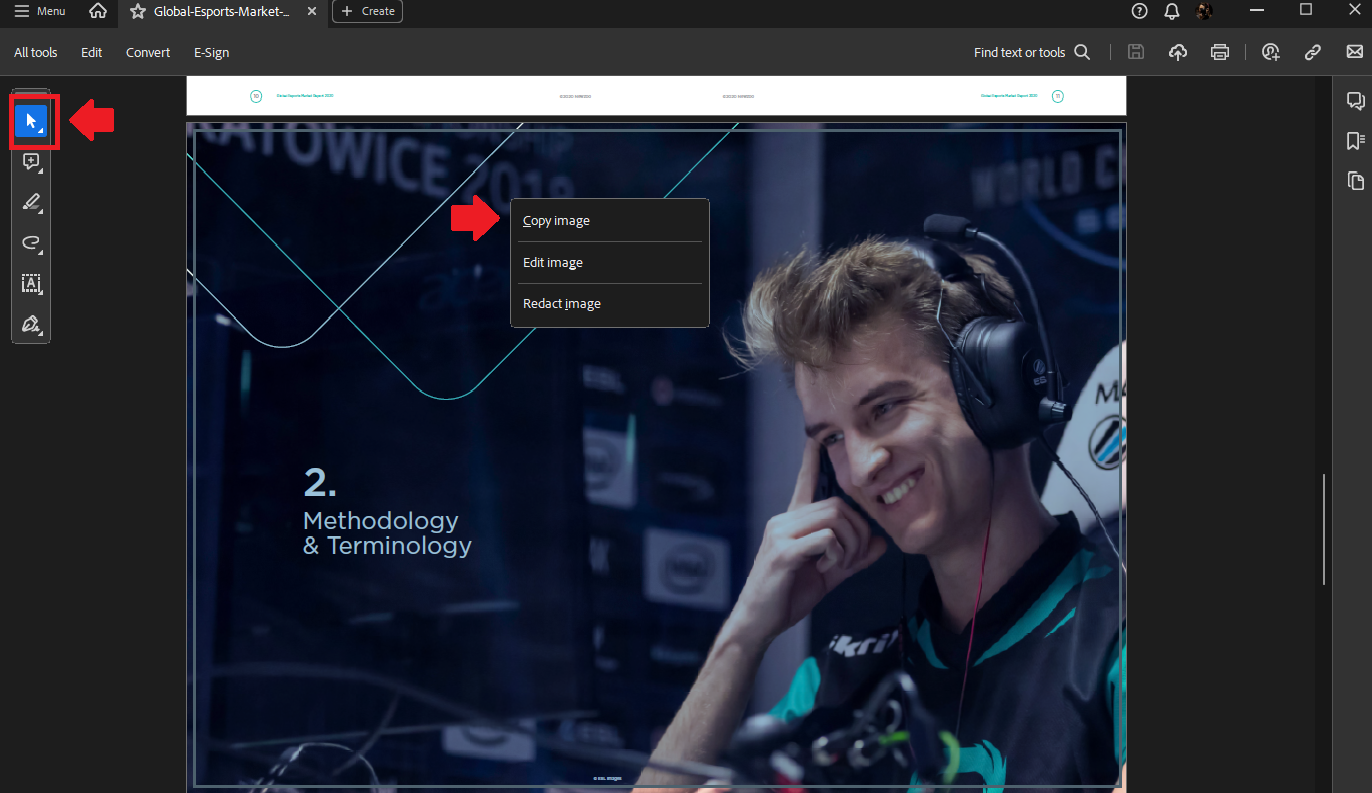 Không phải phần mềm PDF nào cũng hỗ trợ trích xuất hình ảnh dễ dàng. Dưới đây là một số cách giúp bạn sao chép và lưu ảnh từ file PDF trên các hệ điều hành phổ biến. Người dùng có thể trích xuất hình ảnh từ tập tin (file) PDF bằng Adobe Acrobat Reader, một phần mềm miễn phí hỗ trợ Windows và MacOS. Trước tiên, cần tải Adobe Acrobat Reader từ trang web chính thức của Adobe và cài đặt theo hướng dẫn. Sau khi cài đặt, mở tài liệu PDF bằng cách chọn File > Open hoặc kéo...