JavaScript is disabled. For a better experience, please enable JavaScript in your browser before proceeding.
You are using an out of date browser. It may not display this or other websites correctly.
You should upgrade or use an
alternative browser .
Hàm if trong excel là gì? Sử dụng hàm if khi nào?
Hàm IF trong excel là một những hàm phổ biến nhất cho phép bạn thực hiện so sánh lô-gic giữa một giá trị với giá trị bạn mong muốn. Hàm IF trong Excel giúp bạn kiểm tra một điều kiện nào đó và trả về kết quả tương ứng. Nó giống như khi bạn đặt câu hỏi: "Nếu điều này đúng thì làm gì? Nếu không đúng thì làm gì?" Ví dụ, giả sử bạn có một danh sách nhân viên, cột C chứa thông tin "Có" hoặc "Không", biểu thị rằng nhân viên đó có đạt chỉ tiêu hay không....
Đọc bài gốc tại
đây
Đăng nhập một lần thảo luận tẹt ga
window.googletag = window.googletag || {cmd: []};
googletag.cmd.push(function() {
window.uk_delivery_1753154734465 = googletag.defineSlot('/57976558/Ureka_Supply_home.vn_Outstream_1x1_270225', [1,1], 'div-gpt-ad-1753154734465-0').addService(googletag.pubads());
googletag.pubads().enableSingleRequest();
googletag.enableServices();
googletag.display('div-gpt-ad-1753154734465-0');
});
googletag.cmd.push(function() {
if(googletag.pubads().isInitialLoadDisabled() && !window.uk_delivery_1753154734465.getResponseInformation()){
googletag.pubads().refresh([window.uk_delivery_1753154734465])
}
});
window.googletag = window.googletag || {cmd: []};
googletag.cmd.push(function() {
window.uk_delivery_1753685560510 = googletag.defineSlot('/57976558/Ureka_Supply_home.vn_InpageMB_1x1_110325', [1,1], 'div-gpt-ad-1753685560510-0').addService(googletag.pubads());
googletag.pubads().enableSingleRequest();
googletag.enableServices();
googletag.display('div-gpt-ad-1753685560510-0');
});
googletag.cmd.push(function() {
if(googletag.pubads().isInitialLoadDisabled() && !window.uk_delivery_1753685560510.getResponseInformation()){
googletag.pubads().refresh([window.uk_delivery_1753685560510])
}
});

 Đoạn Video
 Ảnh
Ảnh






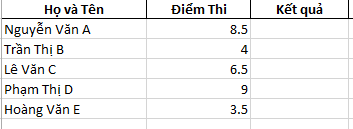 Hàm IF trong excel là một những hàm phổ biến nhất cho phép bạn thực hiện so sánh lô-gic giữa một giá trị với giá trị bạn mong muốn. Hàm IF trong Excel giúp bạn kiểm tra một điều kiện nào đó và trả về kết quả tương ứng. Nó giống như khi bạn đặt câu hỏi: "Nếu điều này đúng thì làm gì? Nếu không đúng thì làm gì?" Ví dụ, giả sử bạn có một danh sách nhân viên, cột C chứa thông tin "Có" hoặc "Không", biểu thị rằng nhân viên đó có đạt chỉ tiêu hay không....